<?xml version="1.0" encoding="utf-8"?><feed xmlns="http://www.w3.org/2005/Atom" ><generator uri="https://jekyllrb.com/" version="3.9.4">Jekyll</generator><link href="/feed.xml" rel="self" type="application/atom+xml" /><link href="/" rel="alternate" type="text/html" /><updated>2024-02-13T17:11:40+00:00</updated><id>/feed.xml</id><title type="html">freax13’s blog</title><subtitle>A small blog for me to write about my interests.</subtitle><entry><title type="html">Bugs Found During My Initial Explorations of the SEV Firmware</title><link href="/cve/cve-2023-31346" rel="alternate" type="text/html" title="Bugs Found During My Initial Explorations of the SEV Firmware" /><published>2024-02-13T17:00:00+00:00</published><updated>2024-02-13T17:00:00+00:00</updated><id>/cve/cve-2023-31346</id><content type="html" xml:base="/cve/cve-2023-31346"><![CDATA[<p>This blog post discusses two recently disclosed low-severity vulnerabilities in the SEV firmware. Both vulnerabilities were published in <a href="https://www.amd.com/en/resources/product-security/bulletin/amd-sb-3007.html">AMD-SB-3007</a>.</p>

<h1 id="cve-2023-31346">CVE-2023-31346</h1>

<p>AMD SEV-SNP guests can request services from the SEV firmware by exchanging encrypted messages. The content and layout of the request and response messages are defined in the <a href="https://www.amd.com/content/dam/amd/en/documents/epyc-technical-docs/specifications/56860.pdf">SEV Secure Nested Paging Firmware ABI Specification</a> in chapter 7.</p>

<p>One of these services is CPUID reporting. CPUID data contains important information about the processor, its supported features, its limits, and the positions of special address bits among other things. Unfortunately, a guest can’t get this data itself, so it has to ask the host. A SEV-SNP guest doesn’t want to trust the host though, so it can use the CPUID reporting service to check whether the untrusted, host-supplied CPUID data is correct. The guest writes some values for some CPUID leaves into the request and sends them to the SEV firmware. The SEV firmware reads those values and checks them. If any of the values are not within the bounds defined in the processor’s CPUID Policy, the values are corrected. All entries as well as a success indicator are sent back to the guest in the response message.</p>

<p>What’s interesting about CPUID reporting requests and responses is that they’re not fixed in size. The requests contain a <code class="language-plaintext highlighter-rouge">COUNT</code> field specifying how many CPUID leaves the guest has placed in the request so the sizes of the requests and responses vary accordingly. The spec caps <code class="language-plaintext highlighter-rouge">COUNT</code> at <code class="language-plaintext highlighter-rouge">64</code> (<code class="language-plaintext highlighter-rouge">COUNT_MAX</code>) and so also places an upper bound on the size of requests and responses. This is convenient for the firmware because it can avoid dynamically sized types and represent a requests and responses as fixed size structs called <a href="https://github.com/amd/AMD-ASPFW/blob/3ca6650dd35d878b3fcbe5c7f58b145eed042bbf/fw/psp_bl_uapps/sev_uapp/src/cpuid_lookup.h#L34-L40"><code class="language-plaintext highlighter-rouge">snp_msg_cpuid_req_t</code></a> and <a href="https://github.com/amd/AMD-ASPFW/blob/3ca6650dd35d878b3fcbe5c7f58b145eed042bbf/fw/psp_bl_uapps/sev_uapp/src/cpuid_lookup.h#L43-L49"><code class="language-plaintext highlighter-rouge">snp_msg_cpuid_rsp_t</code></a>. The firmware uses the size of the response struct when <a href="https://github.com/amd/AMD-ASPFW/blob/3ca6650dd35d878b3fcbe5c7f58b145eed042bbf/fw/psp_bl_uapps/sev_uapp/src/sev_mcmd.c#L5399">zeroing</a> out the response before filling it with data.</p>

<p>While it would be possible to derive the size of the requests and responses from the <code class="language-plaintext highlighter-rouge">COUNT</code> field, this is not the case when they’re encrypted. To solve this the encrypted messages are preceded by an unencrypted header that contains the size of the message among other information.</p>

<p>Because the size of the response varies depending on how many CPUID leaves it contains, the firmware needs to calculate its size at runtime. Fortunately, this is very simple: It turns out that for CPUID reporting the layout of requests and responses is exactly the same, so to make things simple the SEV firmware simply <a href="https://github.com/amd/AMD-ASPFW/blob/3ca6650dd35d878b3fcbe5c7f58b145eed042bbf/fw/psp_bl_uapps/sev_uapp/src/sev_mcmd.c#L5392">uses the size of the encrypted request as the response’s size</a>. While this is mostly fine, there’s one edge case the firmware didn’t account for: It’s possible for a malicious guest to send encrypted CPUID reporting requests that are larger than the <code class="language-plaintext highlighter-rouge">snp_msg_cpuid_req_t</code>. On first thought, this doesn’t seem like a problem: Regardless of the size of the message, the <code class="language-plaintext highlighter-rouge">COUNT</code> field is still capped at <code class="language-plaintext highlighter-rouge">64</code> so the firmware will just ignore the extra data. The problem is that the size is also used for the response and so suddenly the firmware reads more data from the response buffer than expected. In more concrete terms any CPUID leaves past <code class="language-plaintext highlighter-rouge">COUNT_MAX</code> are not zeroed when the response is initialized and contains uninitialized data in the firmware’s memory that is leaked as part of the response.</p>

<p>Fortunately, the leaked memory is unlikely to contain sensitive information because the SEV firmware always zeroes out sensitive information when it’s no longer needed. AFAICT this bug can only be used to leak non-sensitive data like launch pages of SEV-ES guests. For this reason, I’d classify this as a low-severity vulnerability.</p>

<p>There are two more variations of this bug:</p>

<ol>
  <li>It’s also possible to send a smaller request than would be expected for a given <code class="language-plaintext highlighter-rouge">COUNT</code>. In that case, the firmware would interpret uninitialized data as CPUID leaves and try to check them. This would leak the same data as the main variant but is likely harder to exploit.</li>
  <li>The header for encrypted response messages contains some reserved fields. These reserved fields are never initialized and so also leak memory when they are sent back to the guest.</li>
</ol>

<p>These bugs should be fixed by either properly initializing all response fields and/or checking the size of requests or restricting the size of responses.</p>

<p>Proof of Concept code for this bug is available on <a href="https://github.com/Freax13/cve-2023-31346-poc">GitHub</a>.</p>

<h1 id="cve-2023-31347">CVE-2023-31347</h1>

<p>CPUs have internal clocks that can be read out by programs. On x86 the timestamp is stored in the internal <code class="language-plaintext highlighter-rouge">TSC</code> register. It can be read out using the <code class="language-plaintext highlighter-rouge">rdtsc</code> or <code class="language-plaintext highlighter-rouge">rdtscp</code> instructions. If a hypervisor wants to change a guest’s perception of time, it can set some fields in the VM’s control block to apply a scaling factor and offset to the guest’s view of the <code class="language-plaintext highlighter-rouge">TSC</code> register.</p>

<p>In SEV-SNP’s threat model, the hypervisor is untrusted, and so ideally it shouldn’t be able to change a guest’s view of time. This is implemented using a SEV-SNP feature called SecureTSC. If SecureTSC is enabled, the hypervisor can set the TSC scaling factor once when the guest is launched, but crucially can never change it again after the guest has been launched. The offset will always be <code class="language-plaintext highlighter-rouge">0</code>.</p>

<p>SEV-SNP guests can be live-migrated to other hosts. This is very cool, but this opens up a problem: What if the old and new hosts have different TSC frequencies? If the guest was just migrated over without any changes, this would change its perception of time because the TSC frequency would suddenly change. To solve this, the SEV-SNP firmware adjusts the scaling factor such that the TSC frequency stays the same. Lastly, the TSC scaling factor is only adjusted if the SecureTSC feature is enabled in the guest.</p>

<p>Enough theory, let’s talk about how things are actually implemented: Both the set of enabled SEV-SNP features and TSC scaling factor are stored in a structure called the VMCB Save Area (VMSA). This region is encrypted and integrity-protected and contains state like registers, so it’s only natural for it to contain the set of features and the TSC scaling factor as well. So to check whether the SEV firmware needs to adjust the TSC scaling factor, it needs to decrypt the VMSA and check the enabled features. If SecureTSC, it can then update the scaling factor, before re-encrypting the changed VMSA. This is likely what the SEV firmware was meant to to do, but it’s not what it’s actually doing: A mistake was made and the set of enabled features is <a href="https://github.com/amd/AMD-ASPFW/blob/3ca6650dd35d878b3fcbe5c7f58b145eed042bbf/fw/psp_bl_uapps/sev_uapp/src/sev_mcmd.c#L8235">checked</a> before the VMSA is <a href="https://github.com/amd/AMD-ASPFW/blob/3ca6650dd35d878b3fcbe5c7f58b145eed042bbf/fw/psp_bl_uapps/sev_uapp/src/sev_mcmd.c#L8237">decrypted</a> and so the check can’t possibly be correct. AFAICT the buffer that’s checked for the SecureTSC feature is never initialized when the migration is happening and so the check is done against stale data. The result of all of this is that the scaling factor may not be adjusted like expected when a SEV-SNP guest is migrated to another host.</p>

<p>I’m not aware of anyone actually using SecureTSC (the <a href="https://lore.kernel.org/kvm/20231220151358.2147066-1-nikunj@amd.com/">Linux patches</a> for enabling SecureTSC haven’t been upstreamed yet) and I’m also not aware of an exploit that requires messing with a guest’s perception of time, and so given the lack of potential for abuse, I’d classify as a low-severity vulnerability.</p>

<h1 id="on-the-publishing-of-the-sev-firmware">On the Publishing of the SEV Firmware</h1>

<p>IMHO publishing the source code of the SEV firmware was a good decision.</p>

<p>As a security researcher, I want to not just have to trust AMD blindly, but actually check for myself that the SEV firmware is working correctly. I found and reported these two bugs shortly after the SEV firmware was published at the end of August 2023, but that’s not the whole story: While writing code for <a href="https://github.com/Freax13/mushroom">mushroom</a>, I first noticed that some reserved fields are not zero and <a href="https://github.com/Freax13/mushroom/blob/5638605c7f784189fca33a4be02e326ba83f857b/common/snp-types/src/guest_message.rs#L53">worked around</a> that even in mushroom’s first public commit. The oldest reference to this workaround I was able to find in my code was from February 19, 2023, while mushroom was still private. The problem is that at the time I didn’t understand what was going on. I saw the non-zero reserved fields, but just assumed that they’d contain undocumented values and didn’t realize that they were leaking uninitialized memory from the SEV firmware. Only after the SEV firmware was published did I notice that this wasn’t intentional and was able to report this.</p>

<p>As a user of the SEV firmware, I hope that the increased visibility of the SEV firmware will lead to more bugs being fixed, and hope to benefit from the increased security. Having access to the source code is also invaluable when debugging code that interacts with the firmware and explaining <a href="https://twitter.com/13erbse/status/1697487639597691077">unexpected behavior</a>.</p>]]></content><author><name></name></author><category term="cve" /><category term="cve-2023-31346" /><summary type="html"><![CDATA[This blog post discusses two recently disclosed low-severity vulnerabilities in the SEV firmware. Both vulnerabilities were published in AMD-SB-3007.]]></summary></entry><entry><title type="html">Suppressing Debug Events in SEV-SNP Guests</title><link href="/cve/cve-2023-20573" rel="alternate" type="text/html" title="Suppressing Debug Events in SEV-SNP Guests" /><published>2024-01-09T21:30:00+00:00</published><updated>2024-01-09T21:30:00+00:00</updated><id>/cve/cve-2023-20573</id><content type="html" xml:base="/cve/cve-2023-20573"><![CDATA[<p>TL;DR: The host can force a SEV-SNP guest to skip some debug events such as single-step breakpoints and hardware data breakpoints on affected processors by forcing an intercept to occur at the same time. If Restricted injection or Alternate injection is enabled it may be impossible for the host to correctly pass those events to the guest when a VM exit has occurred at the same time. AMD considers the suppression of debug events in SEV-SNP guests a low-severity vulnerability and assigned it CVE-2023-20573. You can find out more in their <a href="https://www.amd.com/en/resources/product-security/bulletin/amd-sb-3006.html">security bulletin</a>.</p>

<h1 id="sev-snp-threat-model">SEV-SNP Threat Model</h1>

<p>SEV-SNP is a confidential computing technology available on AMD EPYC server CPUs starting with EPYC Milan. Like other confidential computing technologies (Intel SGX, ARM CCA, RISC-V CoVE) it can be used to securely run isolated workloads even if the host OS is untrusted, compromised, or malicious. In the case of SEV-SNP, these workloads are encrypted virtual machines that are isolated from the host by the CPU. The two main goals are confidentiality and integrity: It should be impossible for the host to read or write the VM’s memory and registers. It should also be impossible for the host to influence the control flow of the guest.</p>

<h1 id="intercepts">Intercepts</h1>

<p>During the execution of a VM, the host can intercept certain events happening in the guest. Among these events are mostly reads and writes to special registers (e.g. <code class="language-plaintext highlighter-rouge">CR[0-15]</code>, <code class="language-plaintext highlighter-rouge">IDTR</code>, <code class="language-plaintext highlighter-rouge">GDTR</code>) and execution of certain instructions (e.g. <code class="language-plaintext highlighter-rouge">HLT</code>, <code class="language-plaintext highlighter-rouge">CPUID</code>, <code class="language-plaintext highlighter-rouge">INVLPG</code>). One of these events is the nested page fault which happens when the guest attempts to access guest physical memory that isn’t mapped in the nested page tables. This event gives the host a chance to correct the nested page tables before resuming the execution of the guest.</p>

<h1 id="exitintinfo">EXITINTINFO</h1>

<p>If an intercept is triggered while delivering an exception or interrupt, information about it is saved in the <code class="language-plaintext highlighter-rouge">EXITINTINFO</code> field. This allows the host to reinject the exception/interrupt after handling the intercepts to ensure proper execution in the guest.</p>

<p>Note that in a lot of cases, reinjection isn’t actually needed. For example, if an invalid instruction causes a #UD exception inside the guest and the interrupt descriptor table is not mapped in the nested page tables, this will cause a nested page fault. Once the host corrects the nested page tables, execution will continue at the same instruction, once again causing a #UD exception, which can now be delivered because the host mapped in the guest physical memory backing the interrupt descriptor table. The #UD exception will happen regardless of whether the host chooses to reinject.</p>

<p>This property is important for confidential guests because their threat model assumes that the host is untrusted. The guest can’t rely on the host to reinject exceptions.</p>

<h1 id="restricted-injection-and-alternate-injection">Restricted Injection and Alternate Injection</h1>

<p>Restricted Injection and Alternate Injection are optional features that can be activated in the guest to protect it from unexpected exceptions/interrupts injected by the host. With Restricted Injection the host can only inject #HV exceptions. With Alternate Injection the host can’t inject any exceptions (injections can only be done by the guest itself). These restrictions also apply to events in <code class="language-plaintext highlighter-rouge">EXITINTINFO</code>, they cannot be reinjected.</p>

<h1 id="exception-types">Exception Types</h1>

<p>The AMD64 Architecture Programmer’s Manual lists three different types of exceptions:</p>

<ol>
  <li>Faults happen <em>before</em> execution of an instruction.</li>
  <li>Traps happen <em>after</em> execution of an instruction.</li>
  <li>Aborts cannot be recovered (the saved instruction pointer is unspecified).</li>
</ol>

<p>These types primarily affect the saved instruction pointer in the interrupt stack frame and don’t actually reflect the moment the exception is generated. For example, the <code class="language-plaintext highlighter-rouge">INTO</code> instruction generates an #OF trap with the saved instruction pointer set to the next instruction, but the exception happens before the instruction completes executing. How do we know this? If we unmap the interrupt descriptor table and let an <code class="language-plaintext highlighter-rouge">INTO</code> instruction generate an #OF exception, the unmapped interrupt descriptor table causes a nested page fault intercept with the guest instruction pointer still pointing to the <code class="language-plaintext highlighter-rouge">INTO</code> instruction.</p>

<p>Faults will never need to be reinjected because they will happen again after handling an intercept.</p>

<p>There are only two abort-type exceptions: #DB and #MC. #DB (double fault) occurs when handling an exception causes an exception. Therefore #DB happens at the same time as the exception they’ve been caused by. They will need to be reinjected if the exception they’ve been caused by would have needed to be reinjected. It’s unclear to me whether #MC (machine check) exceptions need to be reinjected.</p>

<p>Lastly, traps will need to be reinjected if they happen after the instruction pointer has been updated.</p>

<h1 id="where-it-all-goes-wrong">Where It All Goes Wrong</h1>

<p>There is one exception that can happen after the instruction pointer was updated: #DB (Debug). There are several ways to trigger a #DB exception:</p>

<ol>
  <li>Instruction execution (fault)</li>
  <li>Instruction single-stepping (trap)</li>
  <li>Data Read (trap)</li>
  <li>Data write (trap)</li>
  <li>I/O read (trap)</li>
  <li>I/O write (trap)</li>
  <li>Task switch (trap)</li>
  <li>Debug register access (fault)</li>
  <li><code class="language-plaintext highlighter-rouge">int1</code> instruction (trap but reported before updating the instruction pointer)</li>
</ol>

<p>The traps (exept <code class="language-plaintext highlighter-rouge">int1</code>) are reported after the instruction pointer is increased. As a result, these exceptions can be suppressed by a malicious host if it can cause a VM exit e.g. a nested page fault to occur at the same time. This is a bug, the host shouldn’t be able to change the control flow in a SEV-SNP guest. Additionally, if Restricted Injection or Alternate Injection are enabled it’s impossible for even a well-intentioned to correctly resume processing of these events.</p>

<p>You can find a proof of concept showing the suppression of debug events <a href="https://github.com/Freax13/cve-2023-20573-poc">here</a>.</p>

<h1 id="impact">Impact</h1>

<p>The impact of this should be fairly low for most production workloads. I’m not aware of any software that relies on debug events for security. Some features of debuggers such as single-stepping and hardware breakpoints can be rendered unusable.</p>

<h1 id="discovery">Discovery</h1>

<p>I stumbled across this bug by accident while implementing Linux KVM host patches for Restricted Injection. At first, I didn’t know about <code class="language-plaintext highlighter-rouge">EXITINTINFO</code> and was confused about seemingly random crashes. It turned out that KVM was trying to reinject #PF exceptions that occurred at the same time as an interrupt. Initially, I thought that KVM could simply choose not to reinject, but after thinking about it some more I realized that there are situations where this leads to incorrect behavior in the guest.</p>]]></content><author><name></name></author><category term="cve" /><category term="cve-2023-20573" /><summary type="html"><![CDATA[TL;DR: The host can force a SEV-SNP guest to skip some debug events such as single-step breakpoints and hardware data breakpoints on affected processors by forcing an intercept to occur at the same time. If Restricted injection or Alternate injection is enabled it may be impossible for the host to correctly pass those events to the guest when a VM exit has occurred at the same time. AMD considers the suppression of debug events in SEV-SNP guests a low-severity vulnerability and assigned it CVE-2023-20573. You can find out more in their security bulletin.]]></summary></entry><entry><title type="html">The SEV-SNP Exploit Is Coming From Inside The House. The Building Owner Is Helping Too.</title><link href="/cve/cve-2023-46813" rel="alternate" type="text/html" title="The SEV-SNP Exploit Is Coming From Inside The House. The Building Owner Is Helping Too." /><published>2024-01-07T15:00:00+00:00</published><updated>2024-01-07T15:00:00+00:00</updated><id>/cve/cve-2023-46813</id><content type="html" xml:base="/cve/cve-2023-46813"><![CDATA[<p>This blog post discusses a recently patched privilege escalation vulnerability, CVE-2023-46813, in the Linux kernel that affected guests running as SEV-ES or SEV-SNP VMs.</p>

<h1 id="short-intro-to-amd-sev">Short Intro to AMD SEV</h1>

<p>AMD SEV, SEV-ES and SEV-SNP are confidential computing technologies available on AMD EPYC CPUs that make it possible to securely run trusted VMs on an untrusted hypervisor. In very simple terms, SEV just encrypts the guest’s memory, SEV-ES added encryption and integrity protection of the guest’s registers and SEV-SNP added integrity protection of the guest’s memory. Guests communicate with the hypervisor via unencrypted shared memory pages.</p>

<h1 id="vm-exits-aes-and-naes">VM Exits, AEs and NAEs</h1>

<p>Conventional VMs depend on the hypervisor to emulate certain CPU instructions e.g. <code class="language-plaintext highlighter-rouge">cpuid</code> (queries information about the CPU itself), <code class="language-plaintext highlighter-rouge">inb</code> (writes a byte to an I/O port) and <code class="language-plaintext highlighter-rouge">rdmsr</code> (reads a machine specific register). Whenever one of these events occurs the VM exits to the hypervisor which then emulates the event by directly changing the VM’s registers and resumes the VM.</p>

<p>While this works well for conventional VMs, this approach does not work starting with SEV-ES because the guest’s registers are encrypted and the hypervisor has no way to emulate most events without access to the guest’s registers. To fix this a new exception type was added: Whenever an VM exit occurs that would require access to the guest’s registers a #VC exception is triggered in the guest. The guest will look at the VM exit that was supposed to happen, determine which registers are needed to handle it and then informs the hypervisor about the VM exit and associated registers through a structure called the GHCB (Guest-Hypervisor Communication Block). The hypervisor takes the information from the GHCB, handles the VM exit like a regular VM exit and writes the results back to the GHCB. Finally the guest reads back the results from the GHCB and resumes regular control flow.</p>

<p>There are a couple of VM exits that don’t require access to any registers and those events will not trigger a #VC exception. These exits are called automatic exits (AE) while the ones triggering a #VC are called non-automatic exits (NAE).</p>

<h1 id="mmio">MMIO</h1>

<p>There are two ways for an hypervisor to implement MMIO (memory-mapped I/O) regions:</p>

<ol>
  <li>Map some memory into the region that’s shared between the guest and the hypervisor. This is very fast because it’s just a normal memory access for the guest, but the downside is that there’s no way for the hypervisor to be notified about the accesses. This method is appropriate for MMIO regions such as frame buffers.</li>
  <li>Set an invalid bit in the nested page table entry that maps the guest physical address of the MMIO region to a host physical address. Once the guest tries to access the that guest physical address, the CPU will notice the invalid bit and cause a “nested page fault” VM exit. When a nested page fault occurs the CPU also informs the hypervisor about the instruction bytes that triggered it. The hypervisor is supposed to decode the instruction and emulate the memory access accordingly. This is fairly slow because there’s a context switch on every access, but the upside is that the hypervisor can handle each access individually. This method is approriate for MMIO regions such as registers in PCI devices.</li>
</ol>

<p>Both of these methods also work with SEV(-ES/-SNP) guests:</p>

<ol>
  <li>The guest controls whether a memory page is shared with the hypervisor by setting a special bit, the C bit, in its pagetables. If the guest knows that a region is supposed to be a MMIO region, it can omit the C bit and accesses to the page are no longer encrypted. Both the hypervisor can see the same unencrypted memory.</li>
  <li>With SEV nested page fault VM exits doesn’t require any intervention from the guest. The hypervisor can decode the faulting instruction and access the registers as it would for a conventional VM. With SEV-ES and SEV-SNP nested page faults are considered non automatic exits and so the guest will have to handle them. Unlike the hypervisor, the guest is not given the instruction bytes of the faulting instruction. Instead it’s supposed to look at the instruction pointer at the time of the exception, decode the instruction from its memory and finally emulate it.</li>
</ol>

<h1 id="the-bug">The Bug</h1>

<p>It turns out that handling nested page fault exceptions in SEV-ES/SEV-SNP is inherently racy: The guest kernel isn’t provided with the instruction bytes of the faulting instruction, so it has to go and fetch them itself, but by the time it’s doing that the instruction bytes might have already been changed by another thread. As a result the kernel shouldn’t assume that the instruction it has fetched is the one that caused the #VC exception. Usually when the CPU tries to access memory it checks that it’s currently allowed to access that memory. Those permission checks happen before a #VC exception would be triggered. The problem with the way Linux was handling nested page fault exceptions in its #VC handler was that it was incorrectly assuming that the CPU had already checked memory permissions for the instruction Linux decoded. This is vulnerable to the following race condition:</p>

<ol>
  <li>Thread 1 executes the instruction <code class="language-plaintext highlighter-rouge">mov [MMIO], 1234</code> at address <code class="language-plaintext highlighter-rouge">0x414141</code>
    <ul>
      <li>This instruction tries to write the value <code class="language-plaintext highlighter-rouge">1234</code> to address <code class="language-plaintext highlighter-rouge">MMIO</code>.</li>
      <li>The CPU checks that it’s allowed to access <code class="language-plaintext highlighter-rouge">MMIO</code>.</li>
      <li><code class="language-plaintext highlighter-rouge">MMIO</code> is MMIO region with an invalid bit set in the nested page tables, so a nested page fault #VC exception is triggered.</li>
    </ul>
  </li>
  <li>Thread 2 changes the instruction at <code class="language-plaintext highlighter-rouge">0x414141</code> to <code class="language-plaintext highlighter-rouge">movs [KERNEL], [USER]</code>
    <ul>
      <li>This instruction reads the values at address <code class="language-plaintext highlighter-rouge">USER</code> and writes it to address <code class="language-plaintext highlighter-rouge">KERNEL</code>.</li>
    </ul>
  </li>
  <li>On thread 1, the kernel decodes the instruction at <code class="language-plaintext highlighter-rouge">0x414141</code> and sees <code class="language-plaintext highlighter-rouge">movs [KERNEL], [USER]</code> and emulates it without permission checks.</li>
</ol>

<p>When neither <code class="language-plaintext highlighter-rouge">USER</code> nor <code class="language-plaintext highlighter-rouge">KERNEL</code> point to a MMIO memory region, Linux would emulate this as such by simply copying the value from <code class="language-plaintext highlighter-rouge">USER</code> to <code class="language-plaintext highlighter-rouge">KERNEL</code> <sup id="fnref:1" role="doc-noteref"><a href="#fn:1" class="footnote" rel="footnote">1</a></sup>. This is a problem because the write to <code class="language-plaintext highlighter-rouge">KERNEL</code> shouldn’t be allowed to happen as regular usermode programs shouldn’t have access to kernel memory from usermode. As a result this vulnerability can be used to write arbitrary kernel memory. By swapping the <code class="language-plaintext highlighter-rouge">USER</code> and <code class="language-plaintext highlighter-rouge">KERNEL</code> arguments this can also be used to read arbitrary kernel memory instead.</p>

<p>Another implementation detail that is very convenient is that Linux will properly forward page fault exceptions while emulating the <code class="language-plaintext highlighter-rouge">movs</code> instruction. This means that if <code class="language-plaintext highlighter-rouge">KERNEL</code> is not a valid address, the kernel will not crash, but forward the fault to the user which can handle the exception. This can be used to check whether an address is valid.</p>

<p>There is one significant problem with this attack: It relies on the user having access to a MMIO region. This is commonly not possible because usermode programs rarely directly communicate with the devices that expose these MMIO regions. There’s a way to solve this though: Remember how the hypervisor is explicity untrusted in SEV’s threat model? If we assume the hypervisor is malicous, it can change a regular user mapping into a MMIO memory region by simply setting an invalid bit in the nested page table for that address. As a result a malicous hypervisor can help an unprivileged process in the guest achieve privilege escalation.</p>

<h1 id="exploit">Exploit</h1>

<p>This vulnerability gives us the following exploit primitives:</p>

<ol>
  <li>Check whether an address is valid</li>
  <li>Arbitrary kernel read</li>
  <li>Arbitrary kernel write</li>
</ol>

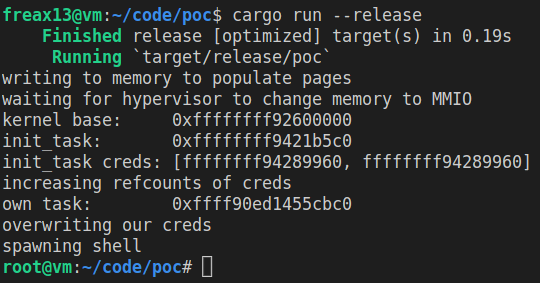
<p>My <a href="https://github.com/Freax13/linux-eop-poc">proof of concept exploit</a> performs the following steps to escalate it’s privileges:</p>

<ol>
  <li>Allocate a huge chunk of memory and write to it to force the kernel to populate it.</li>
  <li>Wait for the untrusted hypervisor to execute the custom <code class="language-plaintext highlighter-rouge">attack</code> command in QEMU. Once this command has been executed, the host will set an invalid bit in the nested page table entry for the guest physical address at <code class="language-plaintext highlighter-rouge">0x1f8b0c000</code> and therefore change it to be a MMIO region. The hope is that this address is belongs the the big chunk of memory allocated in step 1.</li>
  <li>Continously write to all pages in the allocated chunk of memory using a <code class="language-plaintext highlighter-rouge">mov</code>. Once the page that was turned into a MMIO page is hit, the write will trigger a #VC exception. Unlike for the <code class="language-plaintext highlighter-rouge">movs</code> instruction, for the <code class="language-plaintext highlighter-rouge">mov</code> instruction the kernel will check that the memory region was supposed to be an MMIO memory region. Once the kernel notices that the region wasn’t supposed to be a MMIO region it delivers a <code class="language-plaintext highlighter-rouge">SIGBUS</code> signal to usermode. The PoC uses this signal to detect when it hit the page that was turned into a MMIO page.</li>
  <li>Use primitive 1 to find the base address of the kernel by trying all possible values.</li>
  <li>Use primitive 2 to read from kernel memory in order to find the <code class="language-plaintext highlighter-rouge">init</code> task.</li>
  <li>Use primitive 2 to iterate over the <code class="language-plaintext highlighter-rouge">init</code> tasks children to find the <code class="language-plaintext highlighter-rouge">task_struct</code> associated with the PoC’s process.</li>
  <li>Use primitive 2 to read the credentials of the <code class="language-plaintext highlighter-rouge">init</code> task (i.e. root credentials) and use primitive 3 to copy them over to the PoC’s task. This escalates the task’s privileges to root.</li>
  <li>Spawn a shell.</li>
</ol>

<p><img src="../assets/cve-2023-46813/poc-screenshot.png" alt="screenshot of the proof of concept running" /></p>

<p>Here’s a video demonstration of the PoC running on an unpatched system: <a href="https://www.youtube.com/watch?v=6D90uO_PgoU">https://www.youtube.com/watch?v=6D90uO_PgoU</a>.</p>

<h1 id="patch">Patch</h1>

<p>This vulnerability was patched by restricting MMIO accesses to the kernel because of the complexity involved in preventing the race condition. It turned out that there isn’t any usermode code interacting with MMIO regions anyways, so this doesn’t break things in practice.</p>

<p>A variant of this bug exists for I/O instructions which suffer from the same race condition between execution of the instruction, permission checks by the CPU and decoding of the instruction in the kernel. This variant was patched by checking the I/O port permissions again in the kernel before emulating the instruction.</p>

<h4 id="footnotes">Footnotes</h4>

<div class="footnotes" role="doc-endnotes">
  <ol>
    <li id="fn:1" role="doc-endnote">
      <p>Linux can only know which address triggered to nested page fault if the instruction has a single memory operand. <code class="language-plaintext highlighter-rouge">movs</code> has two memory operands, so in this case Linux doesn’t know whether the read from the source, the write to the destination or both have caused the nested page fault. It solves this by emulating the instruction by splitting it up into an individual read followed by an individual write. If either of these accesses causes a nested page fault Linux can then know the addresses that caused fault. If neither access cause a nested page fault this is will just copy the value. <a href="#fnref:1" class="reversefootnote" role="doc-backlink">&#8617;</a></p>
    </li>
  </ol>
</div>]]></content><author><name></name></author><category term="CVE" /><category term="CVE-2023-46813" /><summary type="html"><![CDATA[This blog post discusses a recently patched privilege escalation vulnerability, CVE-2023-46813, in the Linux kernel that affected guests running as SEV-ES or SEV-SNP VMs.]]></summary></entry><entry><title type="html">Exploiting Supermicro BMCs So I Can Sleep At Night</title><link href="/cve/cve-2023-35861" rel="alternate" type="text/html" title="Exploiting Supermicro BMCs So I Can Sleep At Night" /><published>2023-06-28T04:00:00+00:00</published><updated>2023-06-28T04:00:00+00:00</updated><id>/cve/cve-2023-35861</id><content type="html" xml:base="/cve/cve-2023-35861"><![CDATA[<p>At the end of last year I bought a server and was immediately faced with a problem: Servers tend to be loud. At the time this was a big problem for me because I was living in a tiny apartment and the server would run about 10 ft. from where I was sleeping. When I was picking parts, I expected fan noise to be an issue and tried to counter the problem by buying be-quiet! fans and a be-quiet! case. Still the fans were clearly audible even when the server was idling.</p>

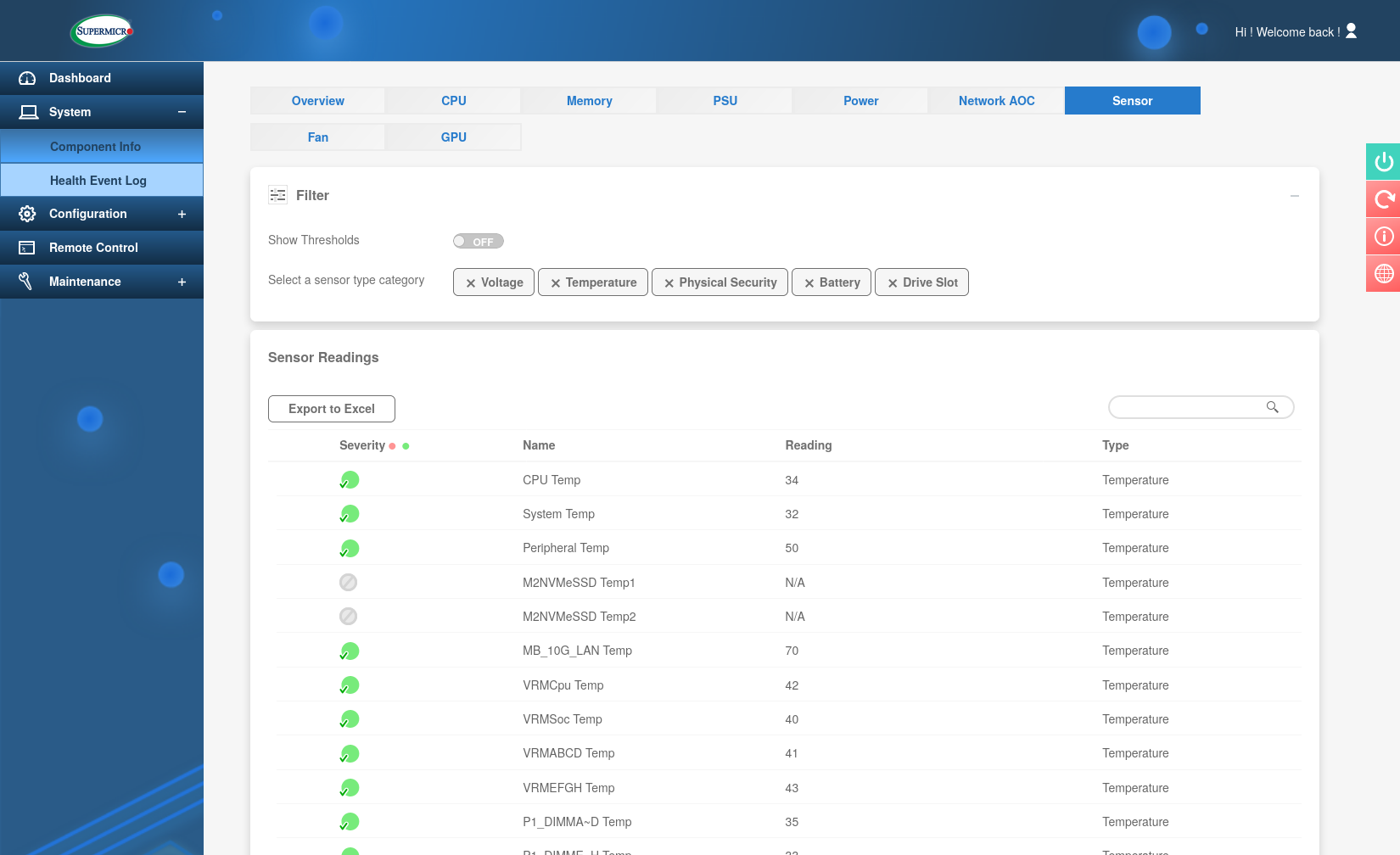
<p>To understand why we need to talk about a bit about the motherboard I picked - the Supermicro H12SSL-NT. On this motherboard the fans are not actually controlled by the operating system but a separate chip called the ASPEED AST2500 BMC. It’s not possible to modify the firmware directly, but it exposes a web panel that can be used to figure it. Taking a look at the sensor section quickly revealed the problem:
<img src="../assets/cve-2023-35861/ethernet-so-hot-right-now.png" alt="screenshot of the sensor section" /></p>

<p>The dual 10Gb network controller regularly reaches 70°C (158°F) causing the fans to spin up. On the “Optimal” fan mode this results in the fans ramping up to about 30%. This may not seem like much but in an otherwise completely silent room I could easily hear the fans at night. Other than that the absolute lowest duty the BMC will ever set the fans to is 20% which again is unfortunately still enough to be audible.</p>

<p>The H12SSL-NT supports up to 7 fans in 2 zones with 4 different fan modes, but unfortunately it’s not possible to manually adjust any fan curves. Not satisfied with this I came up with the following plan:</p>

<ol>
  <li>Get RCE on the BMC.</li>
  <li>Patch the curves on the running system.</li>
  <li>Profit</li>
</ol>

<h1 id="achieving-remote-code-execution">Achieving remote code execution</h1>

<p>I downloaded the latest firmware from Supermicro’s website, ran binwalk and threw some of the binaries into Ghidra. Eventually I discovered some code responsible for sending out email notifications that looked vulnerable to command injection. Simplified the code looks like this:</p>

<div class="language-c highlighter-rouge"><div class="highlight"><pre class="highlight"><code><span class="n">snprintf</span><span class="p">(</span><span class="n">buffer</span><span class="p">,</span> <span class="mh">0x1000</span><span class="p">,</span>
         <span class="s">"echo </span><span class="se">\'</span><span class="s">%s</span><span class="se">\'</span><span class="s"> | %s --host=%s --port=%d --domain=%s --timeout=1 --auth=off --from=%s %s"</span><span class="p">,</span>
         <span class="n">message</span><span class="p">,</span>
         <span class="s">"/bin/msmtp"</span><span class="p">,</span>
         <span class="n">host</span><span class="p">,</span>
         <span class="n">port</span><span class="p">,</span>
         <span class="n">domain</span><span class="p">,</span>
         <span class="n">from</span><span class="p">,</span>
         <span class="n">sender</span><span class="p">);</span>
<span class="n">run_shellcmd</span><span class="p">(</span><span class="n">buffer</span><span class="p">);</span>
</code></pre></div></div>

<p><code class="language-plaintext highlighter-rouge">host</code>, <code class="language-plaintext highlighter-rouge">port</code>, <code class="language-plaintext highlighter-rouge">domain</code>, <code class="language-plaintext highlighter-rouge">from</code> and <code class="language-plaintext highlighter-rouge">sender</code> can be controlled by an authenticated attacker by simply changing the values in the email notification settings.</p>

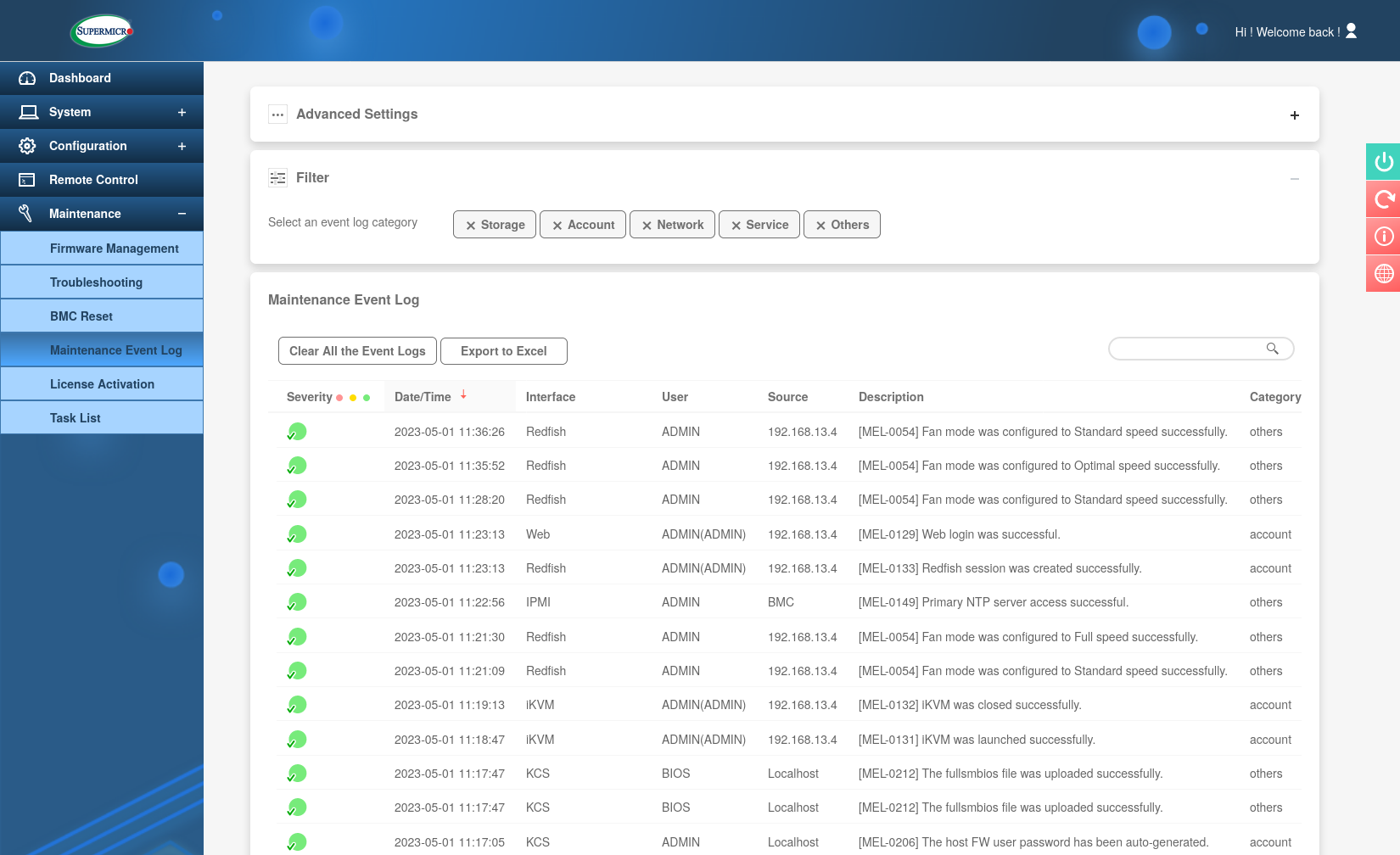
<p>This is already useful for me and my server because I’m obviously an admin on my own machine and can change the settings to exploit this vulnerability, but I decided to dig a little deeper to see if the bug can also be triggered by an unauthenticated attacker. There are several event types that will trigger an email to be sent out. They can be grouped into three categories: alerts, resource changes and status changes. These events can also be seen in the Maintenance Event Log.
<img src="../assets/cve-2023-35861/event-log.png" alt="screenshot of the maintenance event log showing several entries such as for logins, ntp server configuration and fan mode changes" /></p>

<p>The login messages quickly piqued my interest because an unauthenticated attacker might be able to influence them and they would likely end up in the <code class="language-plaintext highlighter-rouge">message</code> parameter. After a bit of trial and error and discovering that spaces are apparently not allowed in the username I was able to come up with <code class="language-plaintext highlighter-rouge">'`ping${IFS}-c${IFS}4${IFS}192.168.13.4`</code> and was able to confirm code execution.</p>

<div class="language-plaintext highlighter-rouge"><div class="highlight"><pre class="highlight"><code># tcpdump -i enp9s0 icmp
tcpdump: verbose output suppressed, use -v[v]... for full protocol decode
listening on enp9s0, link-type EN10MB (Ethernet), snapshot length 262144 bytes
12:42:07.012482 IP 192.168.13.12 &gt; desktop: ICMP echo request, id 2058, seq 0, length 64
12:42:07.012500 IP desktop &gt; 192.168.13.12: ICMP echo reply, id 2058, seq 0, length 64
12:42:08.004739 IP 192.168.13.12 &gt; desktop: ICMP echo request, id 2058, seq 1, length 64
12:42:08.004757 IP desktop &gt; 192.168.13.12: ICMP echo reply, id 2058, seq 1, length 64
12:42:09.004745 IP 192.168.13.12 &gt; desktop: ICMP echo request, id 2058, seq 2, length 64
12:42:09.004760 IP desktop &gt; 192.168.13.12: ICMP echo reply, id 2058, seq 2, length 64
12:42:10.004776 IP 192.168.13.12 &gt; desktop: ICMP echo request, id 2058, seq 3, length 64
12:42:10.004805 IP desktop &gt; 192.168.13.12: ICMP echo reply, id 2058, seq 3, length 64
</code></pre></div></div>

<p>The exploit attempt as seen in the logs:
<img src="../assets/cve-2023-35861/poc-log.png" alt="a log line containing the username" /></p>

<p>At this point I responsibly disclosed the vulnerability to Supermicro. This vulnerability has been assigned CVE-2023-35861.</p>

<p>Now, in this blog post I’ll just use this to run my own code on the BMC to patch the fan curves, but a malicious attacker could potentially do a lot more damage as they have essentially full control over the server, so the actual impact is higher than it might seem at first.</p>

<h1 id="patching-the-fan-curves">Patching the fan curves</h1>

<p>While exploring the firmware I gained a good understanding of the internal workings of the BMC and had already discovered how the fan curves are implemented. For each fan zone there’s a list of sensors in them. Bundled with each sensor are 4 temperature and duty values for each fan mode. As an example the network controller that caused me troubles has the following values by default:</p>

<div class="language-yaml highlighter-rouge"><div class="highlight"><pre class="highlight"><code><span class="na">zones</span><span class="pi">:</span>
  <span class="pi">-</span> <span class="na">MB_10G</span><span class="pi">:</span>
      <span class="na">Standard</span><span class="pi">:</span>
        <span class="na">65</span><span class="pi">:</span> <span class="m">20</span>
        <span class="na">73</span><span class="pi">:</span> <span class="m">40</span>
        <span class="na">84</span><span class="pi">:</span> <span class="m">80</span>
        <span class="na">90</span><span class="pi">:</span> <span class="m">100</span>
      <span class="na">Full</span><span class="pi">:</span>
        <span class="na">65</span><span class="pi">:</span> <span class="m">100</span>
        <span class="na">73</span><span class="pi">:</span> <span class="m">100</span>
        <span class="na">84</span><span class="pi">:</span> <span class="m">100</span>
        <span class="na">90</span><span class="pi">:</span> <span class="m">100</span>
      <span class="na">Optimal</span><span class="pi">:</span>
        <span class="na">65</span><span class="pi">:</span> <span class="m">20</span>
        <span class="na">73</span><span class="pi">:</span> <span class="m">45</span>
        <span class="na">84</span><span class="pi">:</span> <span class="m">81</span>
        <span class="na">90</span><span class="pi">:</span> <span class="m">100</span>
      <span class="na">HeavyIO</span><span class="pi">:</span>
        <span class="na">65</span><span class="pi">:</span> <span class="m">20</span>
        <span class="na">73</span><span class="pi">:</span> <span class="m">45</span>
        <span class="na">84</span><span class="pi">:</span> <span class="m">81</span>
        <span class="na">90</span><span class="pi">:</span> <span class="m">100</span>
</code></pre></div></div>

<p>(The firmware does not actually represent the values in yaml.)</p>

<p>These values are found in a shared library called <code class="language-plaintext highlighter-rouge">libipmi.so</code> and are used by a process called <code class="language-plaintext highlighter-rouge">ipmi_sensor</code>. To patch the curves I wrote <a href="https://github.com/Freax13/fan-recurve/">fan-recurve</a> - a tool can be used to dump and patch the curves in a running system. It uses the <code class="language-plaintext highlighter-rouge">ptrace</code> API to attach to the process and locate and modify the fan curves in place.</p>

<h1 id="results">Results</h1>

<p>Now, did all of this actually work? Yes, it helped a lot.</p>

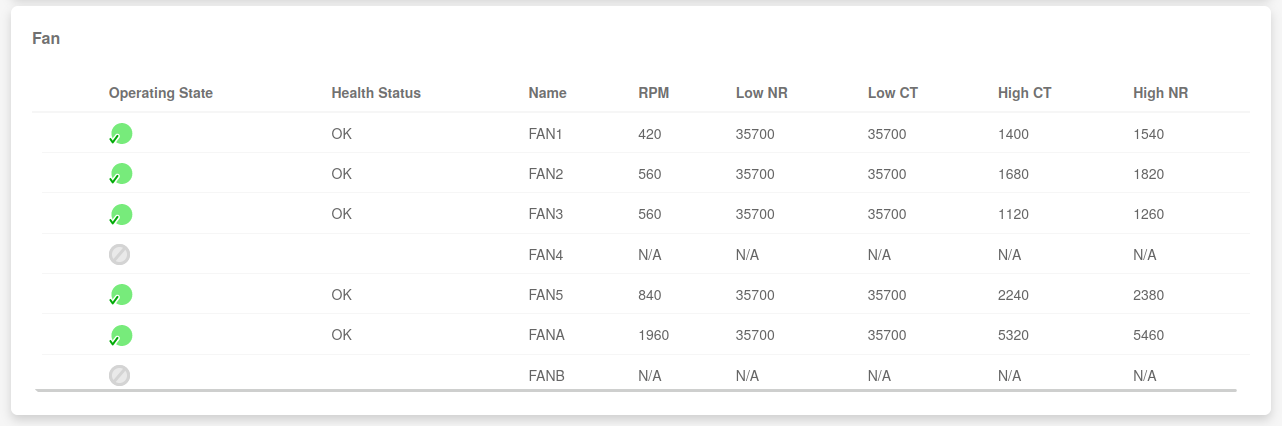
<p>Before the fans looked like this …
<img src="../assets/cve-2023-35861/before.png" alt="A screenshot of the fan section: FAN1: 420, FAN2: 560, FAN3: 560, FAN5: 840, FANA: 1960" />
… and now they look like this.
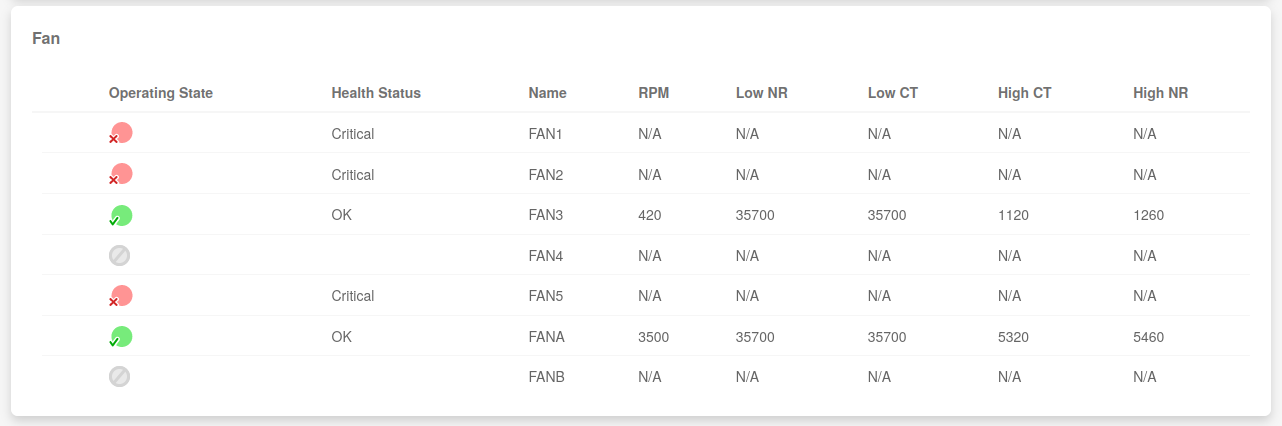
<img src="../assets/cve-2023-35861/after.png" alt="A screenshot of the fan section: FAN1: critical, FAN2: critical, FAN3: 420, FAN5: critical, FANA: 3500" /></p>

<p>Note that the BMC marks some of the fans as “Critical” but this just means that they’ve spun all the way down to 0 rpm, so this is actually a good thing and exactly what I wanted in the first place. For the network controller I installed a tiny 40mm fan blowing air onto its heat sink. That fan is the only fan in zone 2 (FANA), so I changed the fan curves in zone 2 to be higher than what they usually are to keep the network controller nice and cool.</p>

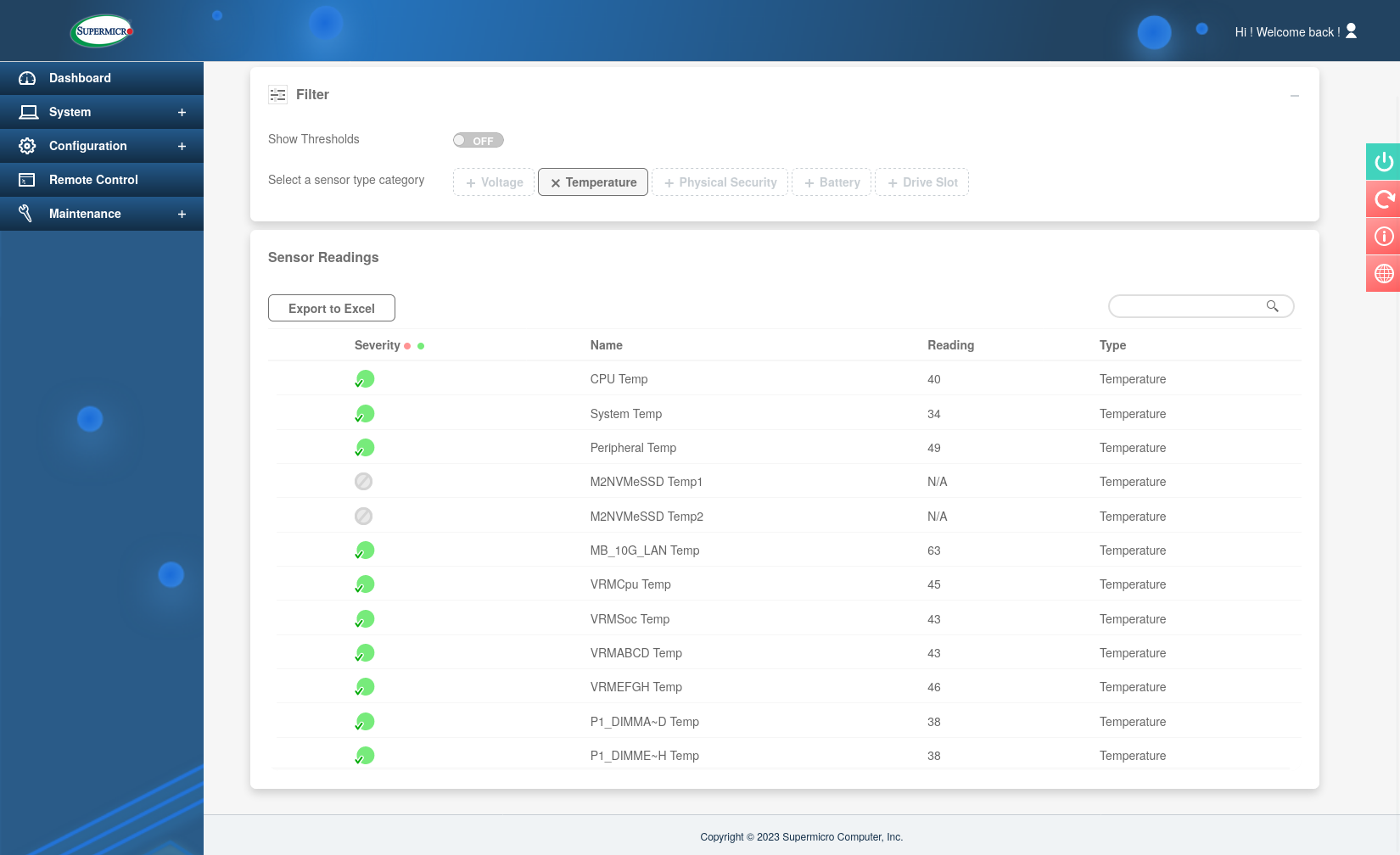
<p>In case anyone’s worried that spinning fans to 0 rpm will cause problems, here are the temperatures with my modified fan curves, they’re completely fine.
<img src="../assets/cve-2023-35861/temps-after.png" alt="CPU Temp: 40, System Temp: 34, Peripheral Temp: 49, MB_10G_LAN Temp: 63, VRMCpu Temp: 45, VRMSoc Temp: 43, VRMABCD Temp: 43, VRMEFGH Temp: 46, P1_DIMMA~D Temp: 38, P1_DIMME~H Temp: 38" /></p>]]></content><author><name></name></author><category term="CVE" /><category term="CVE-2023-35861" /><summary type="html"><![CDATA[At the end of last year I bought a server and was immediately faced with a problem: Servers tend to be loud. At the time this was a big problem for me because I was living in a tiny apartment and the server would run about 10 ft. from where I was sleeping. When I was picking parts, I expected fan noise to be an issue and tried to counter the problem by buying be-quiet! fans and a be-quiet! case. Still the fans were clearly audible even when the server was idling.]]></summary></entry></feed>